Scheduling Device Maintenance
Use the Maintenance Scheduler to schedule maintenance windows on one or multiple devices at the same time.
A maintenance schedule is created at the container level and is available to the devices in that container and subcontainers. You create maintenance schedules and then add devices to the schedules. When the maintenance window begins, all of the devices included in the schedule are put into maintenance mode. If a probe device is put into maintenance mode, all of the devices that are connected to that probe are also put into maintenance mode. While in maintenance mode, no information is collected for affected devices nor are alarms raised.
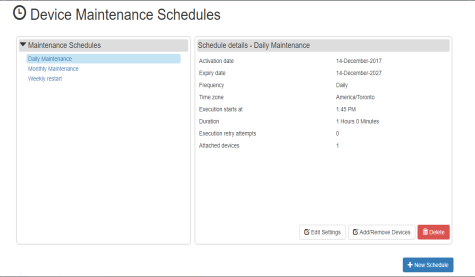
The Device Maintenance Schedules panel displays a list of configured maintenance schedules. From this panel you can do the following actions:
create a new schedule,
view the details of a schedule,
edit the settings for an existing schedule,
add or remove devices to or from an existing schedule, or
delete a schedule.
The following is an example:
A single device can be a member of multiple maintenance schedules. For example, a MiVoice Business or MiVoice MX-ONE device can be included in a daily maintenance schedule and a monthly maintenance schedule.
It is also possible to manually put individual devices into maintenance mode on as needed basis. This is accomplished by enabling the Maintenance Mode check box on the settings page for the specific device. Don't forget to manually disable the Maintenance Mode option once the maintenance is complete. See "Configuring Devices iN Mitel Performance Analytics ".